You want to adapt an openXEdge to your plant topology. The edge has up to three LAN ports, each independently configurable as static or DHCP.
Prerequisites
- You are logged in as a user with the
network-configurationpermission. - You have the planned IPs, gateway and optionally DNS servers at hand.
- Important: the edge reboots after saving — plan for a brief maintenance window.
Steps
-
Top-right cog → Settings → Network in the sidebar.
-
The Netplan Configurator shows one block per interface (e.g.
enp1s0,enp2s0) with method (DHCP / Static), address (CIDR), gateway and nameservers.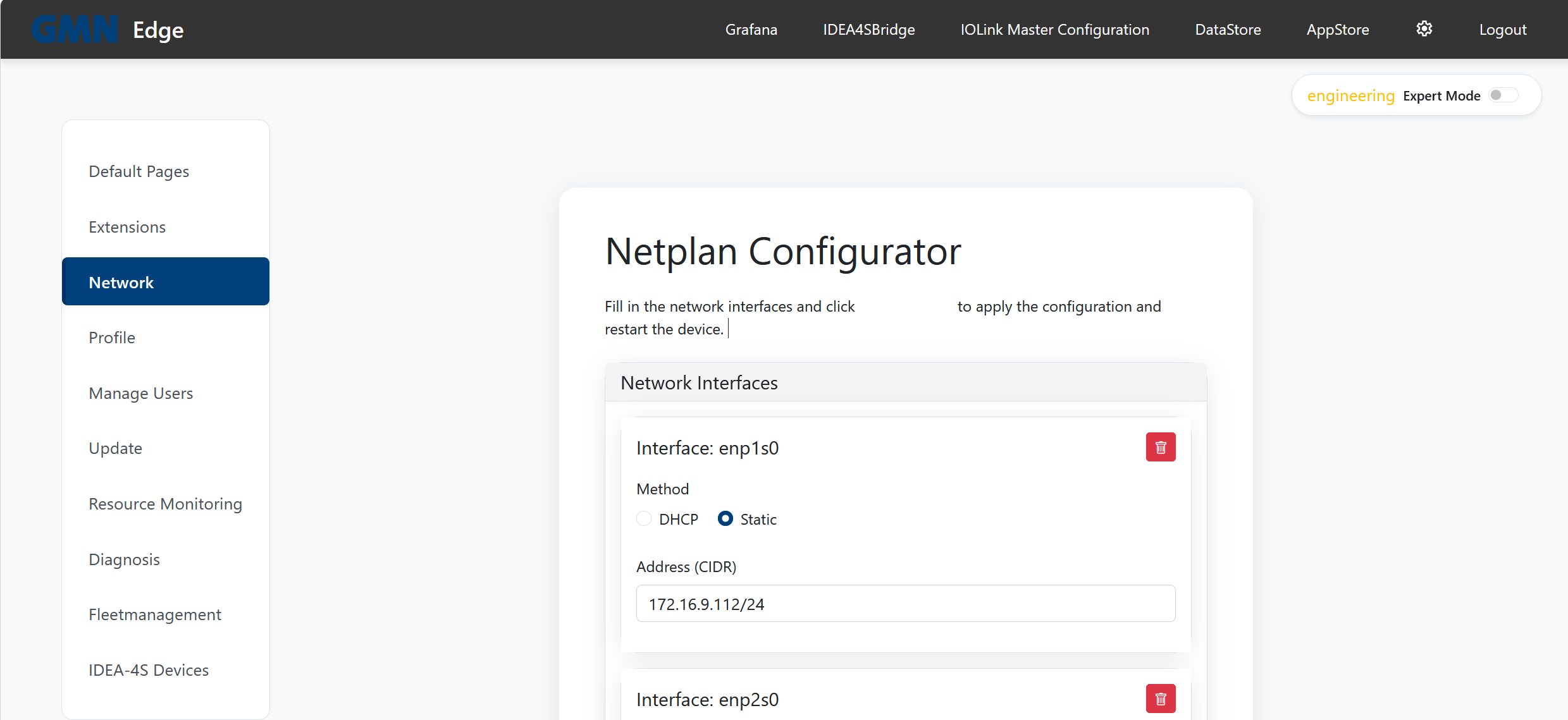
-
Adjust the fields:
- DHCP: no further fields needed.
- Static: address as CIDR (e.g.
172.16.9.112/24); optional gateway and nameservers.
-
Click Save Network Configuration — the edge applies the new config and reboots automatically.
-
After the reboot the UI is reachable on the new address.
Background
The openXEdge supports up to three concurrent network interfaces because it typically lives at the intersection of the plant network, the IO-Link subnet, and an optional third network. MainUI is reachable from every of these IPs; the HTTPS certificate carries all of them as SANs. A dedicated explanation page on the multi-IP architecture is coming — until then contact Brinkhaus support for edge cases.
What if I lock myself out?
- Reconnect via another LAN port if still reachable.
- If all addresses are unknown: read them from the on-device display.
- For emergencies a Brinkhaus service technician can reset netplan via VPN or on-site.