You want to choose which sensor values the IO-Link master actively publishes via MQTT (or delete existing subscriptions). The openXEdge embeds the IFM device’s configuration UI directly — no cable swap, no second tool.
What is embedded here?
Click the IOLink Master Configuration tile on the home page and the openXEdge loads /web/subscribe from the ifm IoT Core firmware of your IO-Link master (example device: AL1304, FW 2.6.x). That is the IFM device’s standard Notification page:
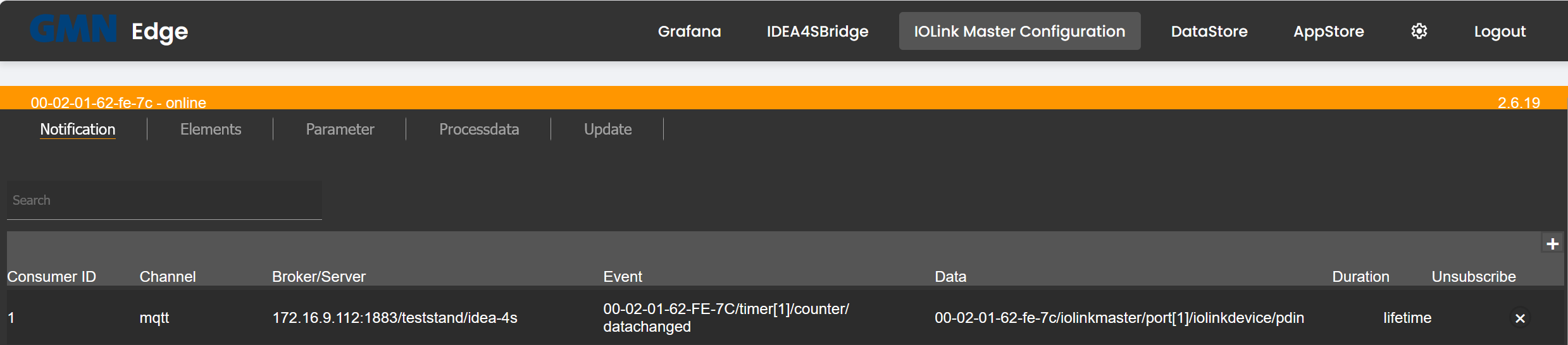
The tabs above (Notification, Elements, Parameter, Processdata, Update) are native ifm-IoT-Core tabs — the openXEdge shows them 1:1; every action affects the IO-Link master directly.
Create an MQTT subscription
On the Notification page click the + in the top-right to add a new row, then per subscription:
| Field | Meaning |
|---|---|
| Channel | Transport — typically mqtt. |
| Broker/Server | Address + port + topic prefix of the MQTT broker. The openXEdge itself runs Mosquitto on port 1883 with no auth. Example: 172.16.9.112:1883/teststand/idea-4s. |
| Event | The event on the master or device that triggers a publish — e.g. 00-02-01-62-FE-7C/timer[1]/counter/datachanged for every tick of an internal timer. |
| Data | Which data points are included — e.g. 00-02-01-62-fe-7c/iolinkmaster/port[1]/iolinkdevice/pdin for process-data-in of the sensor on Port 1. |
| Duration | lifetime (stays until deleted) or a time limit. |
The configuration is stored inside the IFM device, not on the openXEdge. The device keeps the subscriptions across openXEdge reboots; they are part of the “ports in the device” and survive a power cycle.
Delete a subscription
Unsubscribe column → click the ×. The row disappears and the IFM device stops publishing.
When do you need this?
- First time you set up an edge: create the subscription for the IDEA-4S sensor once, so data reaches DataStore and Grafana.
- When the Grafana dashboard is empty: check whether the subscription still exists (some IFM firmware updates clear the list). If yes, check the state; if no, recreate it.
- When you want to forward additional signals — e.g. diagnostic values of the IO-Link master itself.
Notes
- The ifm IoT Core UI is served by the master directly. If it doesn’t appear, the master’s LAN or power is usually faulty. The openXEdge reports that in Settings → Diagnosis under
iolink-proxywith code 3001 (see Diagnosis codes). - For exhaustive documentation of the individual IFM fields refer to the ifm IoT Core manual for your master model — the openXEdge docs focus on the Brinkhaus-specific bits.